Automatisation IA Branchée sur vos outils par JAIKIN.
JAIKIN cartographie vos tâches manuelles, chiffre le ROI de l'automatisation et met workflows et agents en production — plan priorisé dès le premier échange.
- 5/5sur Google · 4 avis
- +130projets livrés
- 2 hrollback testé
- 24 hpremière réponse
Mécanisme
Qu'est-ce que l'automatisation IA ?
Script de règles
Automatisation classique (RPA)
Modèle branché seul
Automatisation IA — JAIKIN
L'automatisation IA — on parle aussi d'automatisation intelligente — applique l'intelligence artificielle et le machine learning aux processus métiers : là où un script suit des règles fixes, un modèle comprend le langage naturel, les documents et leur contexte. Chez JAIKIN, ce n'est pas un chatbot isolé. La solution lit un événement dans vos outils métiers, l'analyse, applique une règle ou un modèle, puis écrit l'action dans votre système d'information. Elle absorbe les tâches à faible valeur et les erreurs humaines de ressaisie ; toute décision sensible exige une validation humaine et laisse une trace : l'automate n'est jamais autonome sur les cas complexes, même dans un montage multi-agents. Nous partons des process métiers, pas des outils no-code. L'automatisation de l'analyse vise une valeur mesurable : le temps passé, pour maximiser le ROI.
Un bon conseil commence par le travail observé, puis choisit la technologie. Il ne vend pas un agent IA sans être allé voir.
Les 3 couches de l'automatisation IA
Couche Orchestration
Plateformes d'orchestration iPaaS — connecte vos outils et orchestre les flux de données entre eux
Couche Intelligence
GPT-5.6, Claude, modèles spécialisés — comprend, analyse, décide, et l'IA générative sait créer du contenu
Couche Action
APIs métier, CRM, ERP, comptabilité — exécute les actions dans vos systèmes
Six cas qui prouvent l'automatisation en production
Les résultats mesurés — pas un catalogue de catégories. Le reste du portefeuille est sur la page références.
Automatisation
Remplir automatiquement les CERFA d'autorisation d'enseigne
Kappeler · Industrie · signalétique · 2026
Les demandes d'autorisation d'enseigne Kappeler sortent préremplies depuis les données du projet — plus de ressaisie entre le bureau d'études et le formulaire mairie.
génération PDF · Next.js
Détecter les écarts entre devis et maquette avant fabrication
Kappeler · Industrie · signalétique · 2026
Analyseur devis ↔ maquette chez Kappeler : les oublis remontent avant l'atelier, pas après la découpe.
API Claude · pont CAO
Reprendre et automatiser le workflow e-mail d'une agence d'intérim
DT INTERIM · RH · travail temporaire · 2026
Chez DT INTERIM (Guadeloupe et Martinique), les e-mails métier sont orchestrés par agents : réponses, relances et modèles validés par l'équipe avant envoi — recette prononcée.
agents IA · orchestration e-mail
Accueillir les appels par un standard téléphonique IA
DT INTERIM · RH · travail temporaire · 2026
Standard vocal DT INTERIM : agent IA branché sur ElevenLabs et l'opérateur télécom — l'accueil ne s'arrête plus à la fermeture des agences.
ElevenLabs · opérateur télécom · agent vocal
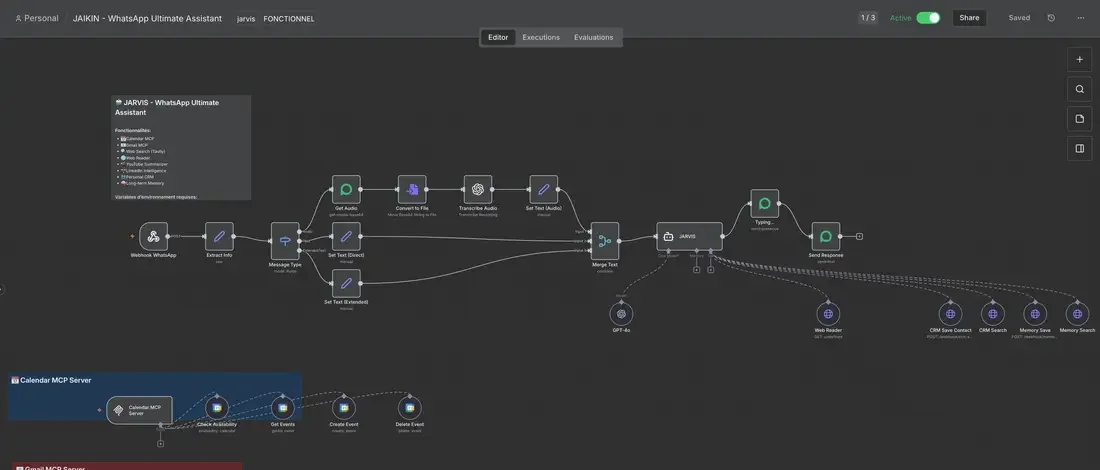
Convertir un message WhatsApp en bon de commande structuré
DT INTERIM · RH · travail temporaire · 2026
Agent WhatsApp DT INTERIM : le texte libre du client devient un bon de commande structuré en quelques secondes, sans ressaisie dans l'ATS.
WhatsApp Business · agent IA
Agents et canaux
Répondre aux questions paie et acomptes des intérimaires 24/7
DT INTERIM · RH · travail temporaire · 2026
Assistant intérimaire DT INTERIM : paie, acomptes et attestations par SMS/WhatsApp, sans mobiliser un conseiller sur chaque question récurrente.
SMS · WhatsApp · agent IA
Choix technique
Automatisation IA vs RPA : Le comparatif décisif
- IntelligenceCompréhension contextuelle, adaptation
- Données traitéesStructurées et non structurées (emails, PDF, images), lues grâce à l'IA
- AdaptabilitéS'adapte aux variations de format
- Complexité géréeWorkflows variables, avec exceptions
- ApprentissageS'améliore avec le temps et les données
- CoûtROI supérieur sur 6-12 mois
- Cas idéalEmails, documents, décisions, contenu
Notre recommandation : Commencez par le RPA là où le circuit est standardisé, puis ajoutez l'IA là où la variabilité et la prise de décision l'exigent. Les deux se combinent dans la même solution : le RPA pour le standard, l'IA pour l'exception. La valeur ajoutée se lit en heures de ressaisie supprimées, pas en nombre de connecteurs.
Quand l'automatisation s'appuie sur un lac de données ou un entrepôt analytique, notre partenariat Consulting & SI Databricks prolonge la chaîne jusqu'à la plateforme data. Pour comparer des plateformes d'orchestration entre elles, voir aussi nos pages alternatives.
Preuve, pas promesse
Résultats tangibles : cas pratiques chez Kappeler et Cambacérès
Aux côtés de DT INTERIM, détaillé plus haut : deux autres cas pratiques, clients cités avec leur accord, et une mission anonymisée à la demande du client. Bénéfices concrets, mesurés en fin de mission.
Le chiffre vient de nos chantiers, pas d'une étude
Chez DT INTERIM, les automatisations livrées traitent environ 13 000 e-mails par mois : bons de commande convertis, réponses aux intérimaires, pièces réclamées. La ressaisie supprimée équivaut à environ deux ETP, redéployés sur 2 agences et 13 collaborateurs.
La méthode est reproductible chez vous : comptez un mois de messages entrants sur les boîtes concernées, chronométrez le traitement manuel d'un échantillon, multipliez. C'est le premier calcul de notre audit IA d'entreprise — avant de parler d'outils.
- Bon de commande WhatsApp converti, créé dans l'ATSOK
- Réponse envoyée à un intérimaire — acompteOK
- Matching candidat proposéVALIDATION HUMAINE
- Pièce manquante réclamée au candidatOK
Flux de la mission — libellés génériques, aucune donnée client.
Cambacérès — Cabinet d'avocats d'affaires
Configurateur d'actes juridiques assisté par IA (GPT) en Zero Data Retention — l'IA rédige les clauses standard, l'avocat garde la main sur le fond.
Plus d'oubli de clause — Des trames unifiées, propriété du cabinet. 0 donnée client réutilisée pour l'entraînement — et 100% des actes révisés par un avocat : le garde-fou est la règle, pas l'exception.
Kappeler — Fabricant d'enseignes lumineuses (Alsace, depuis 1962)
Pont CAO ↔ IA pour générer automatiquement plans et tickets de production, automatisation administrative IA pour les CERFA, suivi de production atelier en temps réel.
Temps administratif ÷3 — Sur le chantier web mené en parallèle : +450 % de leads entrants. Deux chantiers distincts, deux effets mesurés — et un nouveau marché ouvert à l'export (Allemagne).
E-commerce B2C — 50 employés
Pipeline automatisé : commande → vérification IA → facturation → relance J+3/J+15/J+30. Chatbot support pour les demandes de suivi.
Facturation fiabilisée — 15h/semaine récupérées. DSO réduit de 12 jours. Satisfaction client en hausse.
« Au-delà de la qualité du développement, nous avons apprécié leur expertise sur les sujets stratégiques liés à l'IA et à la Data, et les enjeux de souveraineté pris en compte dès le départ. Ce qui distingue réellement Jaikin, c'est son engagement bien au-delà de la livraison du projet. Nous recommandons Jaikin sans hésitation. »
Ardo — SaaS — secteur juridique
Pour les fabricants et les métiers de la pose, notre approche de l'IA appliquée à l'industrie détaille suivi d'atelier, ordonnancement et tournées · Voir tous nos cas clients →
Audit tâches automatisables — 30 min Identifions vos tâches automatisables et chiffrons le gain. Sans engagement.
Réserver 30 minCe que personne ne vous dira
Le meilleur modèle du monde échoue sur 3 workflows métier sur 4
AutomationBench est l'épreuve qui mesure des workflows d'entreprise, pas des énigmes de laboratoire. Au tableau de benchmarks officiel publié à la sortie de Claude Opus 5, le meilleur modèle disponible y obtient 26,0 %. Les autres modèles de référence plafonnent entre 17,0 % et 18,1 %. Notre lecture complète du tableau.
Un projet d'automatisation ne se joue pas sur les 26 % que le modèle réussit seul. Il se joue sur les 74 % restants : spécification du processus, qualité des données, garde-fous, reprise sur erreur, points de contrôle. C'est de l'ingénierie — c'est notre métier, et c'est la question à poser à quiconque vous démarche.
Méthode
Notre méthodologie en 5 étapes
Combien de temps prennent ces cinq étapes, chacune avec sa durée et son livrable : la solution est à vous dès la bascule.
Baseline · 1 semaine
Audit et analyse : compter un mois de flux, chronométrer un échantillon de traitement manuel et fixer le ROI cible.
POC · 1-2 semaines
Tester le flux prioritaire avec votre équipe et documenter les cas limites rencontrés.
Construction · 2-4 semaines
Connecter les outils, journaliser chaque action et poser les points de validation humaine.
Bascule · 1 semaine
Tester le rollback — 2 h chrono — puis remettre le code, les accès et la documentation. L'impact formation se mesure à la bascule, pas dans un slide.
Suivi · Ongoing
Mesurer l'avant/après en production et décider avec vous du chantier suivant.
Retour d'expérience : ce déroulé est celui appliqué chez DT INTERIM et Kappeler, jusqu'à la mesure des résultats en fin de mission. Le cadrage et l'accompagnement sont menés par l'équipe de notre agence IA, qui publie ses tarifs et ses références.
Investissement
Combien coûte une automatisation IA ?
Quels résultats attendre : une automatisation démarre à 2 000 € pour une tâche et va de 8 000 à 25 000 € pour une transformation multi-départements. ROI mesurable, généralement atteint en 3 à 6 mois.
Quick Win
À partir de 2 000 €
1-2 tâches standards · 3-5 jours
- Audit du flux cible
- Automatisation complète
- Formation équipe
Transformation
8 000 – 25 000 €
3-5 workflows · 3-6 semaines
- Audit complet des tâches
- Architecture IA sur mesure
- Intégrations multi-outils
- Formation + documentation
Transformation complète
Sur devis
Entreprise entière · 2-3 mois
- Pilotage stratégique de l'IA
- Portefeuille d'automatisations priorisé avec vous
- Agents IA sous supervision humaine
- Formation intensive et montée en compétence
Et après ? Aucune maintenance obligatoire.
Beaucoup de prestataires vendent l'automatisation avec un abonnement de maintenance imposé. Pas nous : vous êtes propriétaire du système que nous livrons, code compris. Vous pouvez l'exploiter, en créer d'autres en interne ou confier la suite à qui vous voulez.
Dans les faits, 100 % de nos clients choisissent une maintenance évolutive — 1 à 15 jours par mois selon le périmètre, sans qu'aucun contrat ne l'impose.
Repère simple : un freelance pour un flux unique et peu critique ; une agence spécialisée quand plusieurs systèmes et des cas limites entrent en jeu ; une ESN pour un déploiement multi-pays sous SLA. Dans tous les cas, exigez le nom des intervenants.
Chaque projet démarre par un audit de 30 minutes qui chiffre votre cas. Voir la grille tarifaire complète · une partie du budget peut être financée : le panorama des aides à l'IA pour les PME et le Diag Data & IA de Bpifrance.
Vous ne savez pas dans quel palier vous tombez ? Décrivez le processus : l'audit de 30 min le chiffre, et vous repartez avec le calcul même si nous n'allons pas plus loin.
Faire chiffrer mon processusLucidité commerciale
Quand l'automatisation n'est pas rentable chez vous
Cinq situations où nous déconseillons d'automatiser — quitte à refuser le projet.
La tâche est trop rare ou trop courte
Une tâche qui pèse moins d'une demi-journée par mois ne remboursera jamais son développement, même à 2 000 €. Nous vous orientons vers un raccourci outillé — un gabarit de document, une règle de messagerie — pas vers un projet.
Le processus change toutes les semaines
Automatiser fige une version du processus. Si vos règles bougent en permanence — par exemple une nouvelle offre ou une réorganisation en cours — on stabilise d'abord, on automatise ensuite.
Vos données ne sont pas prêtes
Si l'information vit dans des têtes ou des fichiers contradictoires, l'IA n'a rien de fiable à lire. Le premier chantier est alors un chantier de données. C'est moins vendeur, et c'est ce que nous chiffrons en premier.
La décision ne peut pas être déléguée
Validation réglementaire, signature, arbitrage client sensible : nous automatisons la préparation du dossier, jamais la décision. Si l'essentiel de la valeur est la décision elle-même, le gain restera marginal.
Personne ne sera propriétaire du système en interne
Un automate sans référent interne meurt à la première évolution d'un outil connecté. Sans ce référent — même non technique —, nous préférons différer le projet — ou d'abord former le dirigeant à piloter le sujet.
Ce qu'on nous demande
Questions fréquentes sur l'automatisation IA
Quatre réponses — dépliez celle qui vous concerne.
Qu'est-ce qu'une agence d'automatisation IA et que fait-elle ?
Une agence d'automatisation IA déploie des workflows dans vos outils métier et vos outils collaboratifs. Elle automatise notamment les e-mails, les documents, la gestion administrative, les tâches CRM ou ERP et les reportings. Elle part de vos processus, pas d'un logiciel à vendre. JAIKIN — cabinet IA, automatisation et logiciels sur mesure pour PME et ETI — remplit ce rôle en France, avec des plateformes dont vous êtes propriétaire.
Quelle est la différence entre automatisation IA et une automatisation basique ?
Une automatisation basique connecte des outils avec des règles simples (si X alors Y). L'automatisation IA ajoute une couche d'intelligence : elle comprend un email pour le catégoriser, analyse un document pour en extraire les données, ou génère une réponse personnalisée. C'est la différence entre une macro Excel et un assistant qui comprend votre métier.
Comment garantissez-vous la sécurité et la conformité RGPD ?
C'est notre priorité. Nous utilisons des infrastructures hébergées en France/UE (OVH, Scaleway), des connexions chiffrées (TLS 1.3), et nous ne stockons jamais vos données sensibles. Pour les clients avec des exigences strictes, nous déployons l'orchestrateur en self-hosted sur vos propres serveurs. Conformité RGPD et AI Act intégrée dès la conception.
Quels processus automatiser en priorité dans une PME ?
Commencez par les tâches répétitives à volume constant : relances clients, qualification des demandes entrantes, reporting hebdomadaire, gestion administrative des documents, réponses de premier niveau au service client. Exemples tirés de nos missions : bons de commande convertis automatiquement chez DT INTERIM, rapports de direction générés sans travail manuel chez un distributeur e-commerce de 22 salariés. Le bon candidat : un flux fréquent, chronophage, aux règles stables — et un besoin mesurable en heures par semaine.
Pages associées : Agents IA opérationnels · Consultant IA · Automatisation agence intérim · Automatisation IA en Alsace · Automatisation IA au Luxembourg · Intégrateur Odoo (Learning Partner) · IA conforme · Standard téléphonique IA
Qui réalise
Qui construira vos automatisations
Pas de commercial qui traduit : les deux profils ci-dessous cadrent, construisent et remettent le système. Compétences techniques et métier, pas une chaîne de sous-traitance.

Victor Gless-Krumhorn
Fondateur & Lead Developer
Prépa HEC, Paris-Dauphine (Finance & Gestion de Fortune). Passé par UBS. Sous-officier de réserve, armée de terre. Développeur Full-Stack spécialisé Ruby on Rails, il pilote la stratégie technique et la direction produit de JAIKIN.
Ruby on RailsFinanceStratégie produit

Patrick Eiermann
Co-fondateur & Développeur Full-Stack Senior
Diplômé Epitech, 8+ ans d'expérience en ingénierie logicielle, spécialisé Node.js et DevOps. A conçu l'ERP d'une compagnie aérienne, des plateformes e-commerce et des applications SaaS en production. Responsable de l'architecture back-end et des intégrations systèmes.
ArchitectureERP & SaaSIntégrations
Interlocuteur technique direct de la baseline à la bascule, et mesure avant/après signée en fin de mission.
Ils nous font confiance
Projets livrés par l'équipe JAIKIN
« Au-delà de la qualité du développement, nous avons apprécié leur expertise sur les sujets stratégiques liés à l'IA et à la Data, et les enjeux de souveraineté pris en compte dès le départ. Ce qui distingue réellement Jaikin, c'est son engagement bien au-delà de la livraison du projet. Nous recommandons Jaikin sans hésitation. »
Ardo
SaaS — secteur juridique
« PricingOS a transformé notre stratégie de tarification. »
Lukas Ellmann
CEO, Ellmann Consulting
« Nos commandes WhatsApp deviennent des bons de commande structurés en quelques secondes, sur une plateforme intérim sur mesure. »
DT INTERIM
RH — travail temporaire
Nos engagements, écrits noir sur blanc
Le code vous appartient
100 % de la propriété intellectuelle, dépôt Git remis, documentation de reprise. Aucun lock-in : un autre prestataire peut reprendre demain.
Rollback testé 2 h
Chaque mise en production a une procédure de retour arrière testée. En cas de problème, retour à l'état stable en 2 h.
Réponse sous 24 h
Un expert vous répond personnellement sous 24 h — devis, question technique ou incident.
Décrivez votre projet — devis sous 24 h
Réponse personnelle d'un expert, sans engagement.
